Thinking about upgrading to a smart mortise lock? You’re not alone. More homeowners are ditching traditional keys for fingerprint scanners, phone apps, and access codes, especially for exterior doors where security matters most. Smart mortise locks aren’t just the latest tech trend: they’re engineered to fit the beefier mortise hardware found in commercial buildings and older homes with thicker doors. Unlike surface-mounted smart deadbolts, these locks integrate directly into the door’s mortise pocket, offering robust mechanical security with modern digital convenience. This guide walks through everything needed to choose, install, and troubleshoot a smart mortise lock.
Table of Contents
ToggleKey Takeaways
- A smart mortise lock is ideal for homes with existing mortise pockets (especially pre-1950s homes and commercial buildings), offering deeper bolt protection and preserved door integrity compared to surface-mounted smart deadbolts.
- Smart mortise locks support multiple access methods—fingerprint, PIN codes, smartphone apps, and RFID—with battery life ranging 6-12 months and mechanical key backup for emergencies.
- Verify your mortise pocket dimensions (typically 5-6 inches tall by 4 inches deep) and choose connectivity options (Bluetooth, Wi-Fi, Z-Wave, or Zigbee) based on whether you need remote access or local control only.
- Installation costs range $200-$500 for the lock itself, with professional installation adding $100-$200; DIY installation is possible but requires precision work and basic tools.
- Smart mortise locks integrate with smart home systems (Alexa, Google Assistant, Apple HomeKit) to automate routines like disarming security systems and controlling lights when unlocking.
- Regular maintenance—cleaning sensors, using dry graphite lubricant, and monitoring battery levels—ensures your smart mortise lock operates reliably for years without connectivity or mechanical issues.
What Is a Smart Mortise Lock and How Does It Work?
A mortise lock sits inside a rectangular pocket (the mortise) cut into the door’s edge, rather than mounting on the surface like a cylindrical deadbolt. This design includes a lock body with separate latch and deadbolt components housed in a single unit. Traditional mortise locks use a key cylinder and thumbturn: smart versions replace or supplement these with electronic access methods.
Smart mortise locks use battery-powered motors to retract the deadbolt when authorized access is detected, whether that’s a fingerprint, PIN code, smartphone Bluetooth signal, or RFID card. Most models include a backup mechanical key cylinder in case of battery failure or connectivity issues. The internal mechanism typically combines a solenoid or servo motor with the existing spring-loaded latch and bolt system.
These locks communicate via Bluetooth, Wi-Fi, Z-Wave, or Zigbee protocols. Bluetooth models work with your phone when you’re within range (usually 30-40 feet). Wi-Fi-enabled locks connect directly to your home network for remote access from anywhere. Z-Wave and Zigbee versions require a compatible smart home hub (like SmartThings or Home Assistant) to unlock remotely or integrate with other devices.
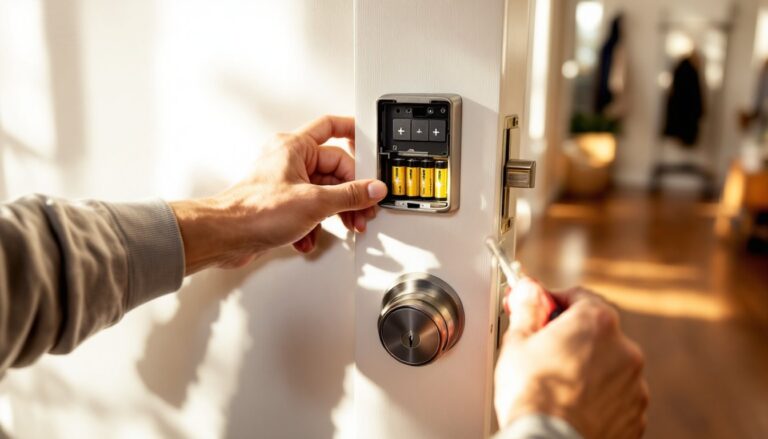
Power comes from AA or lithium batteries housed in the interior escutcheon (the trim plate on the inside of the door). Expect 6-12 months of battery life depending on usage frequency. Most models alert you via app when battery levels drop below 20%, and the mechanical key override ensures you won’t get locked out during a battery swap.
Key Benefits of Installing a Smart Mortise Lock
Keyless convenience tops the list. No more fumbling for keys with groceries in hand or worrying about lost copies floating around. Assign unique PIN codes to family members, house sitters, or contractors, then delete them when access is no longer needed. Many models track who enters and when, creating an access log viewable in the companion app.
Enhanced security comes from multiple access methods and stronger construction. Mortise lock bodies are substantially more resistant to forced entry than cylindrical locks because the bolt extends deeper into the door frame (typically 1 inch vs. ¾ inch) and the entire assembly sits within the door’s core. Smart features add layers: tamper alerts, auto-locking after a set period, and notifications when someone enters.
The robust mechanical design makes mortise locks a better fit for heavy doors, commercial-grade installations, or historic homes originally built with mortise pockets. Converting a mortise door to a cylindrical lock means filling the old pocket and drilling new holes, a process that weakens the door. Upgrading to a smart mortise lock preserves the original structure while adding modern functionality.
Integration with smart home systems lets you build automation routines. Unlock the door and simultaneously disarm the security system, turn on entryway lights, and adjust the thermostat. Voice commands through Alexa or Google Assistant can lock or check lock status (though unlocking by voice typically requires a PIN for security).
One practical advantage often overlooked: temporary access codes are perfect for Airbnb hosts, dog walkers, or maintenance workers. Generate a code that works only during specific hours or days, then expires automatically. No physical key exchange required.
Smart Mortise Lock vs. Traditional Deadbolt: Which Is Right for You?
Installation compatibility is the first consideration. If your door already has a mortise pocket (common in pre-1950s homes, apartments, and commercial buildings), a smart mortise lock is a direct replacement. Switching to a cylindrical smart deadbolt means filling the pocket, patching, and re-drilling, a messy retrofit that compromises door integrity. Conversely, cutting a new mortise pocket in a standard residential door is rarely worth the effort unless you’re replacing the entire door.
For standard residential doors with cylindrical prep (two cross-bore holes: one for the lock body, one for the latch), a smart deadbolt is simpler and often less expensive. Popular smart locks for standard doors install in minutes with just a screwdriver. Mortise lock installation requires more precision and comfort working with door hardware.
Security considerations favor mortise locks in high-traffic or high-risk scenarios. The deeper bolt throw and integrated latch/deadbolt design resist kick-in attempts better than surface-mounted deadbolts. But, the security gap narrows significantly when comparing quality products: a Grade 1 ANSI-rated smart deadbolt with a reinforced strike plate offers excellent protection for most homes.
Cost differences are notable. Smart mortise locks typically run $200-$500, with commercial-grade models exceeding $700. Smart deadbolts range from $100-$350 for comparable feature sets. Factor in potential professional installation costs: mortise locks often require a locksmith ($100-$200), while most homeowners can install a cylindrical smart lock themselves.
The verdict? Choose a smart mortise lock if your door already has mortise prep, you need commercial-grade durability, or you’re renovating a historic home. Opt for a smart deadbolt if you have standard cylindrical bore holes, want easier DIY installation, or you’re working with a tighter budget.
Top Features to Look for When Choosing a Smart Mortise Lock
Lock body dimensions must match your existing mortise pocket. Standard commercial mortise locks use a 1-inch (25mm) bolt throw and fit pockets measuring roughly 5-6 inches tall by 4 inches deep. Measure your current lock body before ordering: residential mortise pockets are sometimes shallower than commercial spec. Manufacturers list case dimensions in product specs, verify fit before purchase.
Connectivity options determine how you’ll control the lock. Bluetooth-only models ($200-$300) work well if you only need phone-based unlocking when you’re home. Wi-Fi models ($300-$450) enable remote locking/unlocking and status checks from anywhere, plus receive real-time alerts. Z-Wave/Zigbee versions ($250-$400) require a hub but integrate seamlessly with existing smart home systems and often use less power than Wi-Fi.
Look for multiple authentication methods: fingerprint scanners, PIN keypads, smartphone apps, RFID cards, and mechanical key backup. Fingerprint readers add convenience but can struggle with wet or dirty fingers. Keypads work in all weather but codes can be observed or shared. The best smart locks evaluated typically offer 3-4 access methods for flexibility.
Battery life and low-battery handling vary widely. Quality units run 8-12 months on 4 AA batteries with typical use. Check whether the lock accepts standard alkaline batteries or requires lithium, lithium performs better in extreme cold but costs more. Essential features: low-battery warnings starting at 20%, and emergency power terminals (usually micro-USB or 9V battery contacts on the exterior) to power the lock if batteries die while you’re locked out.
Weather resistance matters for exterior installations. Look for IP55 rating or higher for dust and water resistance. Capacitive touchscreens can fail in freezing temperatures: mechanical keypads or fingerprint sensors with heating elements are more reliable in cold climates.
Consider ANSI/BHMA grading: Grade 1 (highest) for commercial and high-security residential, Grade 2 for standard residential. This rating covers cycle testing (lock/unlock repetitions), strike testing (forced entry resistance), and finish durability. Many leading smart mortise locks achieve Grade 1 certification.
Smart home integration compatibility includes Amazon Alexa, Google Assistant, Apple HomeKit, Samsung SmartThings, and Home Assistant. Verify which platforms work before buying, not all locks support all ecosystems. HomeKit requires a home hub (HomePod, Apple TV, or iPad) for remote access.
Step-by-Step Installation Guide for DIY Homeowners
Safety first: Always work with the door open and supported. Wear safety glasses when drilling or chiseling.
Tools needed:
- Phillips and flathead screwdrivers
- Tape measure
- Pencil
- Chisel (if adjusting mortise pocket)
- Cordless drill with bits (if installing new strike plate)
- Painter’s tape (to protect door finish)
Materials:
- Smart mortise lock kit (includes lock body, interior/exterior escutcheons, strike plate, screws)
- Batteries (usually 4 AA)
Step 1: Remove the old lock
- Unscrew the interior trim plate and remove it.
- Pull out any connecting rods or cables between interior and exterior components.
- Remove screws securing the exterior escutcheon and pull it free.
- Unscrew the mortise lock body from the door edge and slide it out of the pocket.
Step 2: Check mortise pocket dimensions
- Measure pocket depth, height, and width.
- Compare to new lock specifications (provided in manual).
- If the pocket needs deepening, mark the area and use a sharp chisel, working in ¼-inch increments. Keep cuts square and clean.
- Test-fit the new lock body, it should slide in smoothly without forcing.
Step 3: Install the new mortise lock body
- Slide the lock body into the mortise pocket.
- Align the faceplate flush with the door edge.
- Mark screw holes with a pencil.
- Drill pilot holes if working with hardwood (prevents splitting).
- Secure the lock body with provided screws. Don’t overtighten, you’ll strip the holes.
Step 4: Install exterior assembly
- Feed the cylinder tailpiece (the rod that operates the lock) through the mortise body.
- Position the exterior escutcheon and secure according to manufacturer instructions (usually set screws or through-bolts).
- Test the mechanical key operation before proceeding.
Step 5: Install interior assembly
- Route cables from the exterior assembly through the door (if applicable).
- Install batteries in the interior escutcheon.
- Connect cables to the interior control module.
- Mount the interior escutcheon and secure with screws.
Step 6: Install and adjust strike plate
- Close the door and mark where the deadbolt contacts the frame.
- Position the strike plate over the mark.
- Trace the outline and chisel the mortise if needed (strike should sit flush with frame).
- Drill pilot holes and secure the strike plate with 3-inch screws that penetrate the door frame into the wall stud.
Step 7: Program and test
- Follow the manufacturer’s pairing procedure (usually involves downloading an app and scanning a QR code).
- Create admin PIN codes and enroll fingerprints.
- Test all access methods: app unlock, keypad, fingerprint, and mechanical key.
- Verify auto-lock function and adjust timing if needed.
- Check that the bolt extends fully and retracts smoothly.
When to call a pro: If your door frame is damaged, the mortise pocket needs significant enlargement, or you’re uncomfortable working with precision hardware, hire a licensed locksmith. Installation typically runs $100-$200. For rental properties or condos, check your lease, lock changes often require landlord approval and may need professional installation to maintain insurance coverage.
Troubleshooting Common Smart Mortise Lock Issues
Lock won’t connect to phone or hub
- Verify Bluetooth or Wi-Fi is enabled and you’re within range (Bluetooth typically works up to 30 feet).
- Restart the lock by removing and reinserting batteries.
- Delete and re-pair the lock in the app.
- Check for firmware updates in the app settings, outdated firmware causes connectivity headaches.
- For Z-Wave/Zigbee models, confirm your hub is compatible and within wireless range.
Deadbolt doesn’t extend or retract fully
- Check strike plate alignment, seasonal door swelling or settling can cause misalignment.
- Lubricate the bolt and latch mechanism with dry graphite lubricant (never use oil-based products: they attract dust and gum up over time).
- Verify batteries aren’t low, weak batteries can’t drive the motor fully.
- Inspect for debris in the mortise pocket or strike plate.
- Confirm the lock body is seated properly in the pocket and faceplate screws are snug.
Keypad or fingerprint sensor not responding
- Clean the sensor/keypad with a soft, dry cloth. Dirt, oil, and moisture interfere with capacitive sensors.
- In freezing weather, mechanical keypads work better than touchscreens.
- Re-enroll fingerprints if recognition degrades over time (skin changes with age, moisture, and temperature).
- Replace batteries, sensor components are often first to fail when voltage drops.
False tamper alerts
- Sensitivity settings may be too high. Adjust in the app if available.
- Wind or door vibration can trigger alerts. Tighten hinge screws and add a door sweep to reduce movement.
- Check for loose escutcheon screws, the sensor interprets movement as tampering.
Lock randomly relocks or unlocks
- Review auto-lock settings, default timing may be too short or too long.
- Disable location-based auto-unlock features if they’re triggering unexpectedly.
- Check for unauthorized users in the app’s access log.
- Verify the lock isn’t responding to duplicate Z-Wave/Zigbee commands if multiple hubs are on the network.
Mechanical key won’t turn
- Spray graphite powder (not WD-40) into the keyway and work the key in and out several times.
- Verify you’re using the correct key, some mortise locks use restricted keyways.
- The cylinder may need replacement if pins are worn or damaged. A locksmith can rekey or replace the cylinder without changing the entire lock ($50-$100).
If problems persist after troubleshooting, contact manufacturer support before attempting repairs. Many smart locks include 1-3 year warranties covering defects and malfunctions.
Conclusion
Upgrading to a smart mortise lock combines old-school mechanical security with modern convenience, no key juggling, better access control, and integration with the rest of your smart home. The installation is straightforward if you’re comfortable with basic door hardware, though professional help makes sense for tricky alignments or commercial-grade units. Match the lock to your existing mortise dimensions, prioritize the connectivity and access methods that fit your lifestyle, and don’t skip the strike plate reinforcement. With proper installation and occasional maintenance, a quality smart mortise lock delivers years of reliable, keyless security.