A smart lock replaces or retrofits a traditional deadbolt, allowing homeowners to lock and unlock doors using a smartphone, keypad, fingerprint scanner, or voice command instead of a physical key. They connect to home Wi-Fi or Bluetooth networks and integrate with smart home systems like Alexa, Google Home, or Apple HomeKit. For DIYers and homeowners evaluating security upgrades, smart locks offer keyless convenience, remote access control, and activity tracking without requiring extensive rewiring or professional installation in most cases.
Table of Contents
ToggleKey Takeaways
- A smart lock replaces or retrofits traditional deadbolts, enabling keyless entry via smartphone, keypad, fingerprint, or voice command while integrating with smart home systems like Alexa and Google Home.
- Smart locks operate through motorized deadbolts controlled electronically via Wi-Fi, Bluetooth, Z-Wave, or Zigbee protocols, with battery-powered models lasting 6–12 months and requiring regular maintenance checks.
- Keyless convenience and remote access eliminate fumbling for keys, enable temporary access codes for service providers, and provide activity logs tracking exactly who accessed the door and when.
- Deadbolt replacement models offer the cleanest appearance and full feature sets but require standard door dimensions, while retrofit adapters provide simpler installation for renters but have limited compatibility and features.
- Smart locks meet ANSI/BHMA Grade 1 security standards when properly installed with upgraded strike plates, and they’re not less secure than traditional locks when users practice digital hygiene like rotating codes and enabling encryption on Wi-Fi networks.
- Choose a smart lock based on door compatibility, connectivity needs (Wi-Fi for remote access, Bluetooth for keyless entry), user capacity, weather resistance ratings, and budget ranging from $100 for basic adapters to $350+ for premium models.
How Smart Locks Work: Technology Behind Keyless Entry
Smart locks operate through a combination of mechanical deadbolt hardware, electronic control circuits, and wireless communication modules. The physical locking mechanism, typically a motorized deadbolt, engages and retracts just like a conventional lock, but receives commands from digital sources rather than a turning key.
Connectivity options include Wi-Fi, Bluetooth, Z-Wave, or Zigbee protocols. Wi-Fi-enabled models connect directly to the home network, allowing remote access from anywhere with internet. Bluetooth locks work within about 40 feet, suitable for unlocking as the homeowner approaches but requiring a separate hub or phone proximity for remote operation. Z-Wave and Zigbee models need a compatible smart home hub (like Samsung SmartThings or Amazon Echo Plus) to bridge communication.
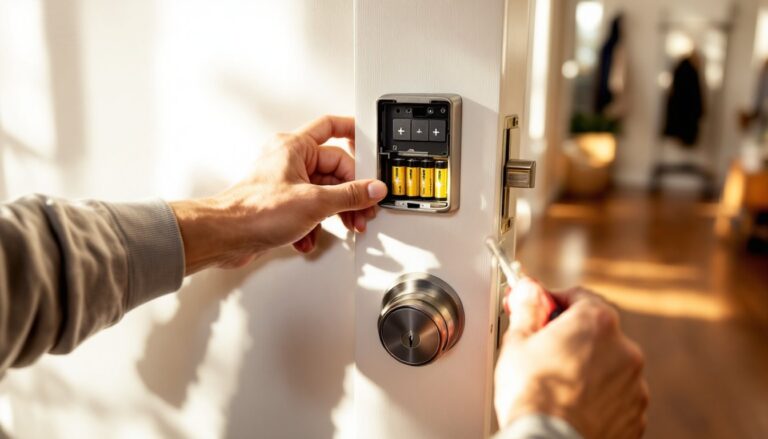
Power sources are battery-operated in most residential models, usually four AA batteries lasting 6–12 months depending on usage frequency. Some hardwired smart locks connect to existing doorbell wiring or low-voltage systems, eliminating battery changes but requiring electrical knowledge during installation.
Authentication methods vary by model. Keypads accept numeric codes that can be temporary or permanent. Biometric scanners read fingerprints for fast, personalized access. Smartphone apps communicate via Bluetooth or Wi-Fi to unlock when authorized users tap a button or approach with auto-unlock enabled. Many smart locks also retain a physical keyhole as a mechanical backup if batteries die or electronics fail.
The lock’s firmware processes authentication requests, verifies credentials against stored permissions, then activates the motor to throw or retract the deadbolt bolt. Activity logs timestamp every unlock event, identifying which method or user code triggered it, useful for tracking family members, service providers, or guests.
Key Benefits of Installing a Smart Lock in Your Home
Keyless convenience eliminates fumbling for keys while carrying groceries or tools. Homeowners unlock doors via smartphone, code, or fingerprint without digging through pockets or purses. Temporary access codes allow plumbers, contractors, or housesitters one-time or time-limited entry without duplicating physical keys or arranging in-person handoffs.
Remote access and monitoring let homeowners lock or unlock doors from anywhere with internet connectivity. Forgot to lock up after leaving for vacation? Lock it remotely. Need to let a delivery driver place a package inside the garage? Issue a one-time code via app. Activity logs show exactly when doors were accessed and by whom, adding accountability for teenagers, renters, or maintenance personnel.
Integration with smart home ecosystems creates automation opportunities. Smart locks can trigger lights to turn on when unlocked after sunset, adjust thermostats when the last person leaves, or disarm security systems upon arrival. Voice commands through Alexa or Google Assistant lock doors during bedtime routines without getting up.
Enhanced security features include auto-lock timers that re-engage the deadbolt after a set period, reducing the risk of leaving doors unsecured. Tamper alerts notify homeowners if someone attempts forced entry or removes the lock. Some models include built-in alarms that sound if the door is opened without proper authentication. Compared to traditional locks, smart locks don’t suffer from key duplication vulnerabilities, codes can be changed instantly if compromised, and lost smartphones can be deauthorized remotely.
Keep in mind that smart lock performance depends heavily on proper installation and network reliability. Weak Wi-Fi signals or drained batteries can create access issues, so regular maintenance checks are essential.
Different Types of Smart Locks Explained
Smart locks fall into two main installation categories: full deadbolt replacements and retrofit adapters. Each suits different door configurations, skill levels, and budget considerations.
Deadbolt Replacement Smart Locks
Deadbolt replacement models remove the existing deadbolt entirely and install a new smart lock assembly in its place. These units include both exterior hardware (keypad, fingerprint scanner, or touchscreen) and interior motorized components.
Installation typically requires a screwdriver and takes 20–45 minutes for a homeowner comfortable with basic hardware projects. The new lock must fit the existing door prep, most residential exterior doors use standard 2-1/8-inch bore holes and 1-inch cross-bore holes compatible with ANSI Grade 1 or Grade 2 deadbolts. Verify backset distance (the space from door edge to bore center, usually 2-3/8 or 2-3/4 inches) before purchasing.
Replacement smart locks offer the cleanest appearance and fullest feature sets, including keypads, biometric readers, and physical key backups. They’re ideal for new construction, door replacements, or situations where the existing deadbolt is worn or non-standard. Many highly rated smart lock options in this category meet ANSI/BHMA Grade 1 security standards, providing the same physical resistance to forced entry as premium traditional deadbolts.
Important consideration: If replacing a deadbolt on a rental property or planning to move, keep the original lock hardware to reinstall later. Most landlords require restoring original fixtures upon lease termination.
Smart Lock Adapters and Retrofit Options
Retrofit smart locks attach to the interior side of an existing deadbolt without replacing exterior hardware. The adapter clamps over the thumb-turn mechanism and uses a motor to rotate it electronically.
Installation is simpler, often tool-free, using adhesive mounting plates or adjustable clamps, making retrofits appealing for renters or homeowners hesitant to modify doors. The existing keyed cylinder and exterior hardware remain unchanged, preserving the door’s appearance from outside.
Trade-offs include limited compatibility. Retrofit adapters work only with standard single-cylinder deadbolts that have rotatable thumb-turns on the interior. Double-cylinder deadbolts (requiring keys on both sides) or non-standard mechanisms won’t fit. The adapter adds bulk to the interior side, which may interfere with trim, molding, or narrow door frames.
Retrofit locks usually rely on Bluetooth and require a smartphone for operation, though some include separate keypads or hub connections for remote access. They’re excellent temporary solutions or trial options for homeowners exploring smart lock benefits before committing to full replacement.
Both types require battery maintenance, set calendar reminders to check battery levels every 4–6 months. Most locks warn users via app or audible beep when power runs low, but proactive replacement prevents lockouts. Keep spare batteries accessible inside the home.
Are Smart Locks Secure? What Homeowners Need to Know
Smart lock security involves both physical and digital considerations. Evaluating both layers helps homeowners make informed decisions about installation and use.
Physical security depends on lock grade and installation quality. Look for locks meeting ANSI/BHMA Grade 1 standards, the highest residential rating for resistance to forced entry, lock picking, and drill attacks. The strike plate, the metal plate attached to the door frame that receives the bolt, should use 3-inch screws penetrating into the wall stud, not just the trim. Many factory strike plates use short screws that fail under kick-in attempts: upgrading this component costs about $8 and dramatically improves security regardless of lock type.
Smart locks with physical key backups maintain the same vulnerabilities as traditional locks to bump keys and picking. But, keyless models eliminate risks of lost, copied, or stolen keys entirely.
Cybersecurity concerns include hacking, signal interception, and unauthorized access. Reputable manufacturers employ AES 128-bit or 256-bit encryption for wireless communications, the same standard used by financial institutions. Regularly updating lock firmware patches security vulnerabilities as manufacturers discover them, enable automatic updates in the lock’s app if available.
Bluetooth locks have limited range and can’t be accessed remotely without a hub, reducing exposure to internet-based attacks but also limiting convenience. Wi-Fi locks offer remote access but require strong network security, use WPA3 encryption on the home router, create unique passwords for each device, and enable two-factor authentication on the lock’s app account.
Common vulnerabilities stem from user behavior rather than lock technology. Sharing access codes via unsecured text messages, using obvious codes (1234, birthdates), or failing to delete codes for former employees or contractors creates security gaps. Rotate codes quarterly and immediately revoke access for anyone who no longer needs entry.
Battery failure is the most common lockout cause. Keep a physical key accessible in a secure off-site location (with a trusted neighbor or in a locked vehicle) or choose a lock with external emergency power ports, some models allow connecting a 9V battery to terminals on the exterior keypad to provide temporary power for unlocking.
Smart locks aren’t inherently less secure than traditional deadbolts. In fact, features like activity logging, tamper alerts, and instant code changes often improve overall security when users follow basic digital hygiene practices. Independent reviews and testing from trusted security experts can help identify models with proven track records against both physical and digital attacks.
Choosing the Right Smart Lock for Your Home
Selecting a smart lock starts with evaluating door compatibility, connectivity needs, and household usage patterns.
Door compatibility is non-negotiable. Measure the existing deadbolt’s bore hole diameter, backset distance, and door thickness before shopping. Standard residential exterior doors are 1-3/4 inches thick, but some older or custom doors vary. Check whether the door swings inward or outward, most smart locks are designed for inward-swinging doors. Outward-swinging doors may require specific models or professional installation to ensure proper fit.
Metal doors, particularly steel security doors with narrow frames, may interfere with Bluetooth or Wi-Fi signals. Test signal strength or consider models with external antennas or hardwired connectivity.
Connectivity requirements depend on how the homeowner plans to use the lock. For remote access from work or vacation, Wi-Fi or hub-enabled locks are necessary. For simple keyless entry when home, Bluetooth models suffice and often cost $50–$100 less. Z-Wave or Zigbee locks integrate best with existing smart home systems but require compatible hubs.
Check whether the lock requires a proprietary hub or works with existing devices. Some brands charge subscription fees for remote access or advanced features like video integration, factor ongoing costs into the decision.
User capacity matters for households with multiple residents, frequent guests, or service providers. Entry-level locks store 10–20 user codes: mid-range models handle 50–100. Biometric locks typically store 30–50 fingerprints. Large families or rental property managers need higher-capacity models.
Weather resistance is critical for exterior installations. Look for locks rated for temperatures from -20°F to 140°F and IP ratings indicating moisture and dust protection (IP65 or higher for fully exposed locations). Covered porches tolerate standard models, but doors facing direct rain or snow need weatherproof designs.
Integration preferences influence brand selection. Locks compatible with Alexa, Google Assistant, or Apple HomeKit enable voice control and automation. Verify compatibility with existing smart home platforms before purchasing, not all locks support all ecosystems.
Budget considerations range from $100 for basic Bluetooth retrofit adapters to $350+ for premium Wi-Fi deadbolt replacements with biometric readers and video cameras. Mid-range models ($150–$250) offer solid feature sets for most homeowners without unnecessary complexity.
Installation complexity varies. Retrofit adapters suit DIYers with minimal experience, while full deadbolt replacements require comfort with hand tools and precise alignment. If the door needs new holes drilled or frame modifications, hiring a locksmith ($75–$150 labor) ensures proper installation and avoids damaging the door.
Read user reviews focusing on battery life, app reliability, and customer support responsiveness. Brands with strong reputations for firmware updates and responsive service teams reduce long-term frustration. Test the return policy, some locks work flawlessly for one household but clash with another’s door configuration or network setup, so flexibility helps.